 Integrations
Shopify integration guide
Verilo is a Shopify app. Shopify is where Verilo finds the order, the product images and the tracking number it checks a claim against, and where your plan is billed.
Last checked against the product on
On this page
What the integration does#
- Reads your orders: the order number, items, value, fulfilments and tracking numbers, and the customer's name and email.
- Reads your products: titles and images, so the customer's item can be compared with your own photos.
- Bills your plan on your Shopify invoice.
- Opens Shopify admin from Verilo: Open in Shopify on a claim, and Refund Issued and Replacement Sent from the helpdesk card.
Before you start#
- A Shopify store, and an account allowed to install apps on it.
- Product images in Shopify for the items you sell. Without one, the item can only be checked for shape.
- Tracking numbers on your fulfilments. Without one, the shipping label cannot be matched and the best Result is Needs Review.
Install Verilo#
Step 1: Open Verilo on the Shopify App Store (opens in a new tab) and click Install.
Shopify shows the access Verilo asks for. Approve it.
Step 2: Approve a plan.
Shopify shows Verilo's plan for approval. Every plan has a 14-day free trial with 20 verifications, once per store, and nothing is charged during the trial.
Step 3: Follow the guided setup.
See Getting started.
You should see: Verilo copies your 50 most recent orders straight away.
| Access Verilo asks for | What it reads |
|---|---|
| Orders | Order number, date, total and currency, fulfilment status, and the items (title, quantity, SKU, variant, line total). |
| Products | Product titles and images. |
| Fulfilments | Shipped and delivered dates, tracking numbers, carriers and tracking links. |
| Customers | The order customer's name and email only. Not phone numbers or addresses. |
Confirm it is working#
In Verilo, open Integrations. The Shopify card shows Connected, your store, and Last sync.
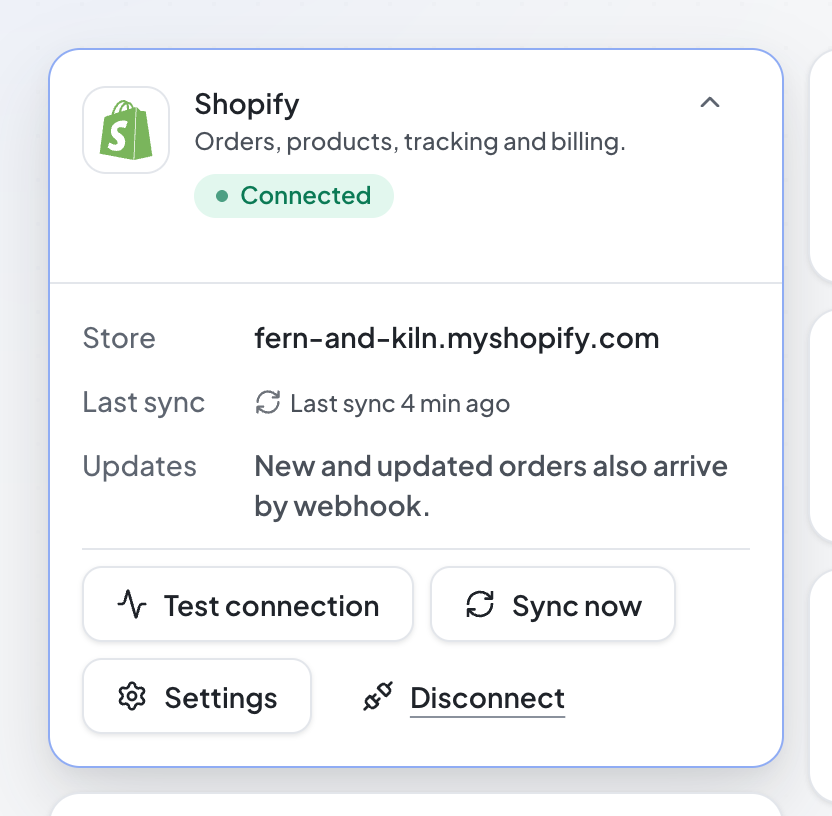
- Test connection answers "Shopify answered: connected to {your store}."
- Sync now (Admins) copies your 50 most recent orders again: "Synced {n} recent orders from Shopify."
How orders reach Verilo#
- At install: your 50 most recent orders.
- As they happen: Shopify tells Verilo whenever an order is created or updated.
- On demand: when you search for an order by its number or the customer's email in Create Claim, or a helpdesk ticket names an order, Verilo looks it up in Shopify, however old it is.
Plans and billing#
| Plan | Price | Includes |
|---|---|---|
| Starter | $29 a month | 50 verifications a month |
| Growth | $79 a month | 250 verifications a month |
| Scale | $199 a month | 1,000 verifications a month |
- Billing is on your Shopify invoice. Invoices and the payment method are in your Shopify admin; Verilo's Billing page has Open Shopify billing.
- A verification is one completed capture. Links that are never finished do not count.
- When the month's verifications are used, new links pause until the allowance resets or you change plan. Links already sent can still be finished. There are no extra charges.
- Change plan in Billing: Shopify asks you to approve the change.
Signing in#
Open Apps → Verilo in your Shopify admin to sign in to Verilo. The dashboard opens at verilo.app, outside the Shopify admin. You can also go to verilo.app/login, enter your store address and click Log in with Shopify.
Troubleshooting#
The Shopify card says "Reconnect needed"#
What you see
"Verilo can no longer read its Shopify access. Open Verilo from your Shopify admin to reconnect."
How to fix it
- In your Shopify admin, open Apps → Verilo. Shopify renews Verilo's access.
An order is not in Verilo#
Why it happens
- It is older than the 50 most recent orders and has not changed since Verilo was installed.
How to fix it
- In Create Claim, search by the order number or the customer's email: Verilo looks it up in Shopify.
- Or click Sync now on the Shopify card.
"This order has no tracking number in Shopify"#
Why it happens
- The order's fulfilment has no tracking number.
How to fix it
- Add the tracking number to the fulfilment in Shopify. Verilo picks it up when Shopify reports the order as updated; for a recent order you can also click Sync now on the Shopify card.
"No shop photo: the item is checked for shape only"#
Why it happens
- The product (or variant) has no image in Shopify.
How to fix it
- Add a product image in Shopify. It applies to claims created from then on.
"Verilo is no longer installed on that store"#
Why it happens
- Verilo was uninstalled, so its dashboard is closed.
How to fix it
- Install Verilo from the Shopify App Store again to sign in.
Uninstall or reinstall#
To uninstall, open Apps in your Shopify admin and uninstall Verilo. (The Disconnect button on Verilo's Shopify card takes you there.) New claims stop at once and the dashboard closes.
Reinstalling within 48 hours brings your claims and settings back as they were; you approve a plan again. After that, Verilo starts empty. The free trial is once per store, so a reinstall does not start a new one.